
SiteSeer users asked, we delivered!
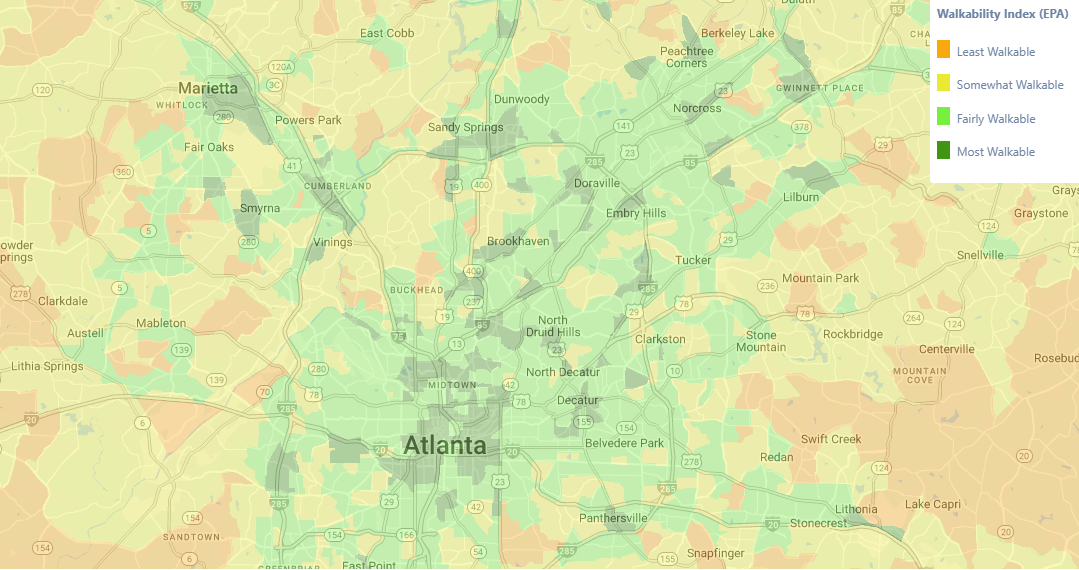
We’ve added a new Walkability Index theme to SiteSeer, giving you a clear view of how walkable neighborhoods are across the U.S. This data is available across all SiteSeer schemas and can be viewed at any location by zooming or panning the map.
The Walkability Index helps quantify access to everyday destinations—like retail, services, employment, and transit—and can be used alongside your other demographic, consumer, and market data to support location and market decisions.
Using the Walkability Index
Walkability is a measure of how easy it is to walk from a given neighborhood to nearby destinations, including areas surrounding your site.
SiteSeer’s Walkability Index is based on the U.S. Environmental Protection Agency’s National Walkability Index, which is available at the block group level—smaller than Census tracts and more granular than many commonly referenced measures.
Each block group in the United States is assigned a walkability score derived from characteristics of the built environment that influence whether people are likely to walk as a mode of transportation.
The index incorporates factors such as:
Street intersection density
Proximity to transit stops
Diversity of land uses
These measures are drawn from the EPA’s Smart Location Database, including indicators related to transportation access, employment mix, and household mix. The Walkability Index provides a no-cost walkability dataset that can be used alongside other market data and serves as an alternative to popular commercial walkability products, such as Redfin’s Walk Score®.
Learn more about the National Walkability Index methodology.
View Walkability data in SiteSeer
To access the Walkability Index in SiteSeer Professional, go to the Layers menu, navigate to Shaded Map Themes and select Walkability Index.
Questions about how to incorporate walkability/walk score into your location analysis? Contact our team for a demo of the SiteSeer platform.